
Eshop–ERP integration, so nobody types an order twice.
Eshop–ERP integration ends double entry: your WooCommerce or B2B eshop and Odoo update each other by themselves on prices, stock, customers and orders. Before we write any code, we agree in writing which system has the last word on each kind of data.
- Odoo to eshop: products and prices
- Odoo to eshop: stock per warehouse
- eshop to Odoo: orders
- eshop and Odoo, both ways: customers and VAT numbers
- Odoo to eshop: invoices and MARK numbers
WHERE AN ESHOP STUMBLES WITHOUT AN ERP CONNECTION
When the eshop and the ERP (your business software) don't talk to each other, someone in the office fills the gap by hand.
The same quantity written three times, one of them wrong Orders typed in a second time
Someone re-enters every eshop order into the ERP, line by line, so the invoice can be issued and the parcel packed. The more orders you get, the more hours go into it, and one day a product code or a quantity goes in wrong.
The order reaches your business software on its own, once.
One order, from a phone to OdooAn almost empty shelf and a phone where Skroutz says in stock Skroutz sells something you don't have
Skroutz, Greece's best-known marketplace, shows a product as in stock when it sold out in the warehouse yesterday. A customer orders it, and you phone them to cancel. The ERP knew it had sold out; Skroutz never found out.
When stock changes in your software, the eshop and Skroutz see it.
A B2B customer sees one price on the eshop and another on the invoice One price on the eshop, another on the invoice
A trade customer sees one price on the eshop and another on the invoice, because their discount exists only in the ERP. Then come the phone calls, a credit note and lost time on both sides.
Each customer's discount comes from the software, so the invoice says what they saw.
The connection mapThe same order entered twice in the software The same order goes in twice
The connection drops for a few minutes, and when it's back the same order goes into the ERP twice, or not at all. You find out when two parcels leave, or when the customer asks where theirs is.
Each order goes through once, and if the connection drops it waits until it's back.
WHICH SYSTEM HAS THE LAST WORD
Before we build the connection, we write down for each kind of data which system has the last word, which way it goes and how often. The table usually looks like this:
Scroll sideways to see all columns
| Data | Has the last word | Direction | How often |
|---|---|---|---|
| Products, codes and barcodes | Odoo | Odoo → eshop | On every change |
| Retail, wholesale and per-customer prices | Odoo | Odoo → eshop | On every change |
| Stock per warehouse | Odoo | Odoo → eshop and marketplaces | Every few minutes |
| Descriptions and photos | The eshop or Odoo, as agreed | To the eshop and the marketplaces | On every change |
| Orders | The eshop | eshop → Odoo | Within seconds, once each |
| Customers and VAT numbers | Odoo | Both ways, with a VAT-number check | With every new customer or change |
| Invoices and MARK numbers (myDATA) | Odoo | Odoo → the customer's eshop account | As soon as the MARK is back |
Your own table goes into the connection map, and a few rows may differ.
THE CONNECTION MAP
Most connections break because nobody decided at the start which system has the last word. So before we write any code, we write the connection map with you.
For each kind of data, the map says which system has the last word and what happens when two systems disagree. It says how an order is resent without going in twice, who sees the errors, and who owns the code, the passwords and the logs (the record of every transfer). See a sample connection map.
You get it with the connection, in English or Greek. Whoever looks after it later, your own team, your group's IT or another partner, knows exactly how it works.
CONNECTION MAP
Company S.A. · eshop and OdooPage 3 of 8
1When the two systems disagree
| Data | Wins | Then |
|---|---|---|
| A price changed in both | Odoo | Email to the pricing manager |
| Stock | Odoo | The eshop is corrected within 5 minutes |
| Customer address | The eshop | Goes to Odoo with a note |
2If the connection drops
The order waits its turn and is resent after 1 and 5 minutes. Its order number stops it going in twice.
3Who sees the errors
The warehouse manager, by email and as a task in Odoo. If it isn't fixed within two hours, Premiumspace is alerted too.
4What belongs to you
The code, in your own account. The passwords, in your own Odoo. The record of every transfer (logs), for 12 months.
Agreed on 14 October 2026
ONE ORDER, FROM A PHONE TO ODOO
An order's journey, step by step. Use the switch to see what happens when the connection to Odoo drops.
- The eshop
- The connection
- Odoo
- The warehouse
Stock and order status back to the eshop
- A customer orders three products on their phone and pays by card.
- The connection picks up the order and checks the customer, the product codes and the amounts.
- The order goes into Odoo once, with its customer and its lines.
- Odoo doesn't answer. The order isn't lost: it waits its turn.
- Another try in a minute, and again in five. The customer on the eshop notices nothing.
- Odoo is back. The connection checks that the order hasn't gone in already, and enters it once.
- The warehouse sees the order in Odoo and packs the parcel.
- Stock updates on the eshop and the marketplaces, and the customer sees that their order is being prepared.
CONNECTING ODOO TO WOOCOMMERCE, SKROUTZ, COURIERS AND BANKS
Prices and stock come from Odoo and reach everywhere you sell. Skroutz and BestPrice, the big Greek marketplaces, get the same stock and prices as your eshop.
- Eshop
- WooCommerce
- Shopify
- B2B wholesale eshop
- Marketplaces
- Skroutz
- BestPrice
- Shopflix
- Public
- Couriers
- Voucher from the order
- Tracking number on the eshop
- Payments
- Cards
- Cash on delivery
- Bank transfer
- Banks
- Bank transactions in Odoo
- Payments matched to orders
A B2B ESHOP FOR WHOLESALE
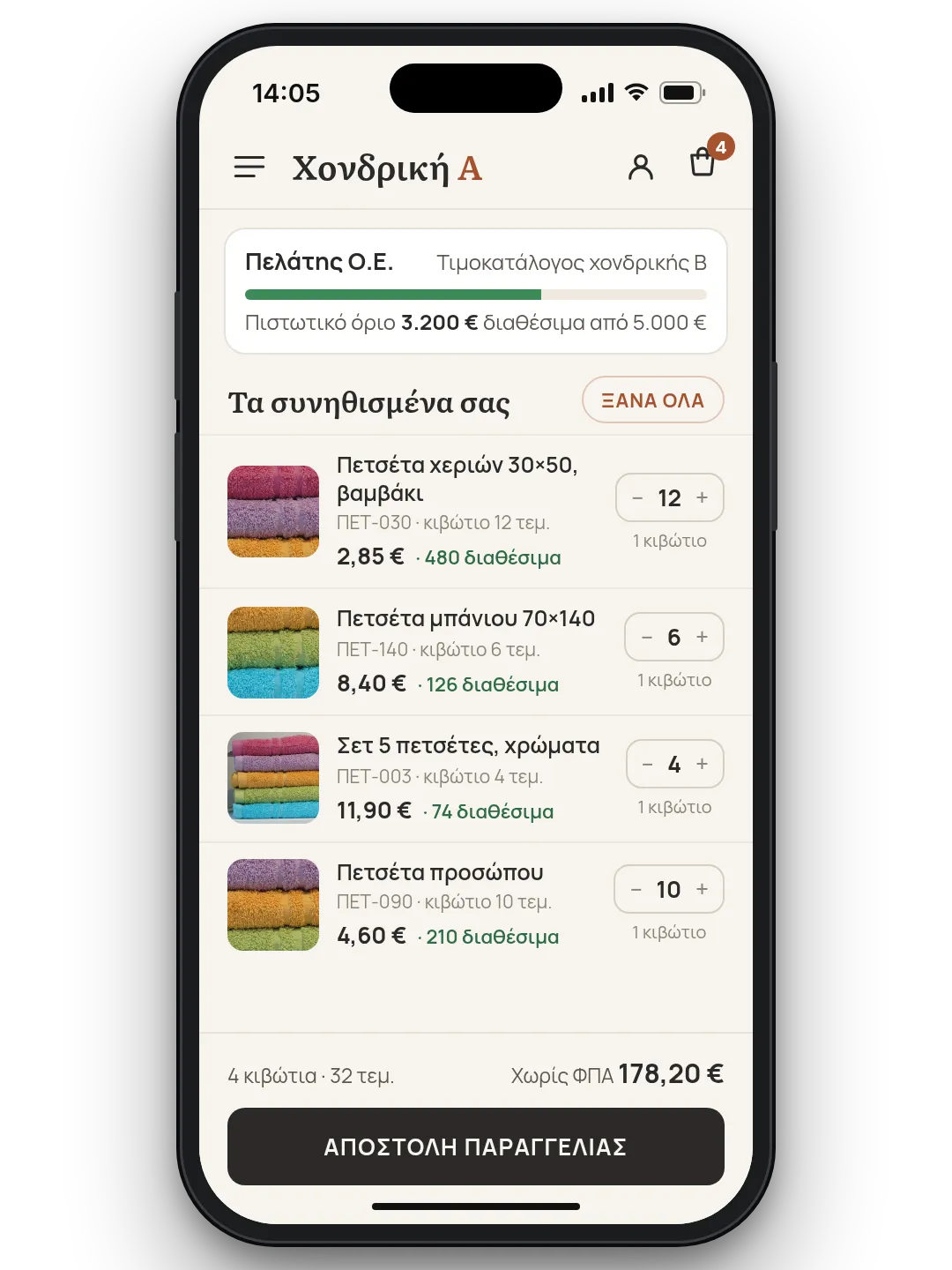
Your trade customers order on their own, from a phone or a computer, instead of by phone and email. They log in to their account and see their own prices, the stock available and their credit limit.
They reorder their usual items in one click and find their invoices in their account. Everything comes from Odoo, so the price they see is the price on the invoice.
If you like, the B2B eshop also becomes an Android app with your logo, on your customer's phone.
FROM THE SOFTWARE YOU USE TODAY TO ODOO
Not on Odoo yet? You don't have to change everything at once. We start with the eshop and Odoo for orders and stock, and invoices keep coming from the software you use today.
Once your team is used to it, we move invoicing and the rest to Odoo, one piece at a time, without stopping work. Every step is tested first on a test copy, not on the system you work in.
If your group runs its own ERP elsewhere, the Greek company can run on Odoo and report back to it. See how we set up Odoo for companies in Greece.
- The software you use todaykeeps issuing invoices
- Orders & stock in Odoofirst step, with the eshop
- Invoicing & the restwhen you're ready
ESHOP AND ERP INTEGRATION WITH NO DOUBLE ENTRY
When your eshop, your business software, your suppliers and the marketplaces update automatically, your office stops keying in the same thing twice.
- Retail and wholesale
However many stores you run, one stock figure
Your WooCommerce stores and Odoo stay in step both ways, with each store's own price rules, so you never sell what's run out. Anything that doesn't go through waits its turn, and a console shows you what needs attention.
- Dropshipping
The supplier's catalogue, ready as XML for your eshop
The whole catalogue comes in at once from the supplier's API. Shipping costs work themselves out from weight and delivery method, and at regular intervals your eshop gets a ready XML file, with nobody lifting a finger.
- Eshop
Many wholesale suppliers, one catalogue
The files of your wholesale suppliers, each in its own format, go into one shared catalogue, ready for the marketplaces. Every new supplier goes in without the effort.
- Marketplaces
From Skroutz to the invoice, with no typing
Every order from Skroutz or the eshop gets its invoice automatically. When the customer gives a VAT number, their details are checked first, and the PDF is saved or printed on its own.
What are you still keying in by hand? Tell us and we'll show you how it stops.
QUESTIONS
What does an eshop–ERP integration actually do?
It moves products, prices and stock from the ERP (your business software) to the eshop, and orders from the eshop to the ERP, automatically, so nobody types them in by hand. We connect WooCommerce and B2B eshops to Odoo, and before we start we write down which system has the last word on each kind of data.
Do changes go through in real time?
Orders reach Odoo within seconds. Prices update on every change and stock every few minutes, depending on how many products and stores you have. We write the timing into the connection map.
What happens if the connection drops?
No order is lost. It waits its turn and goes into Odoo as soon as the connection is back, exactly once. Anything that needs attention shows in a console, and anything that didn't go through you resend with one click. See it in one order's journey, with the switch “What if the connection drops?”.
We're not on Odoo. What now?
You don't have to change everything at once. We start with Odoo for orders and stock, connected to the eshop, and invoices keep coming from the software you use today. The rest moves to Odoo step by step, without stopping work.
Can you connect Skroutz too?
Yes. Skroutz, BestPrice, Shopflix and Public take stock and prices from Odoo, like the eshop, so they never show something as available after it has sold out. Their orders can become invoices automatically, with a VAT-number check.
Who owns the connection?
We write it into the connection map before we start: who owns the code, where the connection runs, and who holds the passwords and the logs. Your accounts and data always stay yours.
Can you work in English with our group's team?
Yes. Proposals, the connection map and handover notes are in English or Greek, and we talk to your Greek accountant and warehouse in Greek.
How much does it cost?
It depends on what is synchronised, in which directions, and how many stores you have. Once the connection map is written, you know exactly what will be connected and we give you a fixed price.
RELATED SERVICES
Odoo Greece
Odoo set up for a company in Greece, with myDATA, delivery notes, ERGANI and payroll.
Greek e-invoicing
Odoo or your eshop connected to a licensed provider before 31 January 2027.
Websites & eshops
Eshops that load fast on a phone, show up in Google and connect to Odoo from day one.
Odoo & WooCommerce
The two-way connection between WooCommerce and Odoo, store by store.
TELL US WHICH SYSTEMS NEED TO TALK.
Name them. We start from the connection map and put what we connect, and the fixed price, in writing.