
Custom API integrations and apps, where no plugin fits.
When there's no ready-made connector, we write one: we connect Odoo and your eshop to Greek couriers, banks, payment services and any system with an API, and build B2B ordering apps and small tools for your team. Every connection knows what to do when the other system doesn't answer, and the code stays yours.
Eshop or Odoo
Order #10482 · ready to ship
- Parcels
- 2 · 4.8 kg
- Cash on delivery
- €86.40
- Eshop or Odoo to The connection: notification (webhook)
- The connection to Eshop or Odoo: tracking number
The connectionwritten for the way you work
- checks address, postcode and phone
- if the courier doesn't answer, retries without duplicate vouchers
- keeps a log of every shipment
- The connection to Courier: the shipment, in the courier's format
- Courier to The connection: voucher and label
Courierthrough its API
- Voucher
- 7300482159
- Label
- PDF, to the warehouse printer
Connected the same way
- Bank
- Payments
- B2B app
- Partner API
WHERE THE OFFICE LOSES HOURS WITHOUT AN API INTEGRATION
When two systems have no ready-made connection, someone in the office does the job by copy and paste.
A parcel stamped returned, and a hand-copied voucher with the wrong number Courier vouchers, one at a time
Every afternoon someone copies addresses and phone numbers from the orders into the courier's website to create the vouchers (the Greek name for a courier waybill). Then the tracking number has to go back into each order, or it doesn't, and the customer calls to ask where the parcel is.
The voucher comes from the order, with parcels, weight and cash on delivery.
One voucher, step by stepBank movements with no invoice against them Payments hunted down in online banking
Every morning someone opens online banking and works out which deposit belongs to which invoice. Cash-on-delivery money arrives from the courier as one sum for dozens of parcels, and splitting it takes hours.
Bank movements reach Odoo every day and are matched to invoices.
Trade orders by message, by email, on a scrap of paper and by phone Trade customers order by phone
Your trade customers send orders by phone, email and messaging apps, each with their own product codes. Someone types them into the system and asks the warehouse whether there's stock before replying.
Trade customers order for themselves, with their prices and the stock in front of them.
A B2B ordering appA list of connections where one has stopped The connection stopped and nobody noticed
Someone set up a connection with a webhook, a notification one system sends to another. The other side didn't answer for a while, and the connection stopped without telling anyone: WooCommerce, for example, disables a webhook after five failed delivery attempts by default. You find out days later, from a customer.
If a system doesn't answer, nothing is lost: it waits its turn and is sent again on its own.
CUSTOM APPS AND INTEGRATIONS: WHAT WE BUILD
The connections people ask for most have their own pages: eshop–ERP integration, marketplaces and supplier XML feeds. This page covers everything else. If a ready-made plugin does the job properly, we tell you before we write any code.
API integrations
An API is the way a system takes and gives data to other systems. We read each side's API and write down what goes where. If one side has no API, the connection works with files or with emails in a fixed format.
Eshop and courier
The voucher is created from the order in the eshop or in Odoo, with parcels, weight and cash on delivery, and the label prints in the warehouse. The tracking number goes back to the order and the customer, and the parcel's status updates on its own.
Payments and banks
Bank transactions come into Odoo every day and are matched to invoices. Card payments and cash on delivery are recorded against the order they belong to, without digging through online banking.
B2B ordering apps
Trade customers and resellers order on their own, with their own prices, stock and credit limit, all from Odoo. If you want, it also comes as an Android app with your logo.
Tools for your team
Small apps for one specific job: a barcode stocktake on a phone, a screen for the sales rep on the road, a form that replaces a spreadsheet. They sit on top of Odoo or the eshop, so nothing is typed in twice.
Webhooks and scheduled syncs
Whatever must happen at once goes out as a notification (webhook) the moment it happens. Whatever can run at intervals, such as stock or bank transactions, runs on a schedule, and a regular check catches anything that slipped through.
AT ONCE OR AT INTERVALS: WHEN EACH CONNECTION RUNS
Some data must go out the moment it changes; some only needs checking every few minutes or once a day. We usually combine the two, because a notification can get lost. An example for an eshop with a courier, a bank and a B2B app:
Scroll sideways to see all columns
| What we connect | How | How often | If something goes wrong |
|---|---|---|---|
| Order → courier voucher | Notification (webhook) from the eshop or Odoo | As soon as the order is ready | Retries, after checking that no voucher was already created |
| Parcel status | A query to the courier's API | Every 30 minutes, for open shipments | The next query picks it up |
| Bank transactions | A connection to the bank, where one exists, or a file from online banking | Every morning, or more often | An email if no transactions arrive on a working day |
| Orders from the B2B app | Straight into Odoo, through its API | At once | Waits its turn and goes through once |
| Prices and stock in the B2B app | From Odoo, with every change | Within seconds | A nightly check corrects anything that slipped |
For each connection we write this down with you in the connection map, before any code.
ESHOP TO COURIER: ONE VOUCHER, STEP BY STEP
One order's journey from the warehouse to the customer's door. Flip the switch to see what happens when the courier doesn't answer.
- The eshop
- The connection
- The courier
- The customer
Tracking number and parcel status back to the eshop
- Order #10482 is ready: two parcels, 4.8 kg, cash on delivery. In the warehouse someone clicks “Ready to ship”.
- The eshop immediately sends a notification (webhook) to the connection. The connection checks the address, postcode and phone number, and writes the shipment in the format the courier expects.
- The courier's API accepts the shipment and returns a voucher number and the label as a PDF.
- The courier doesn't answer. The shipment isn't lost and nobody retypes it: it waits its turn.
- A new attempt two minutes later. Before resending, the connection asks the courier whether a voucher already exists for #10482, so that two don't get created.
- The courier answers normally. One voucher is created, not two.
- The tracking number is written on the order, and the label prints on the warehouse printer.
- The customer gets an email with the tracking number and a link to follow the parcel.
- Every half hour the connection asks the courier what happened to open shipments. The next morning the parcel is delivered and the cash on delivery is collected.
- The order turns “Completed” in the eshop and in Odoo. The cash on delivery waits for the courier's bank deposit, and is matched to the order on its own when it arrives.
A B2B ORDERING APP FOR YOUR CUSTOMERS
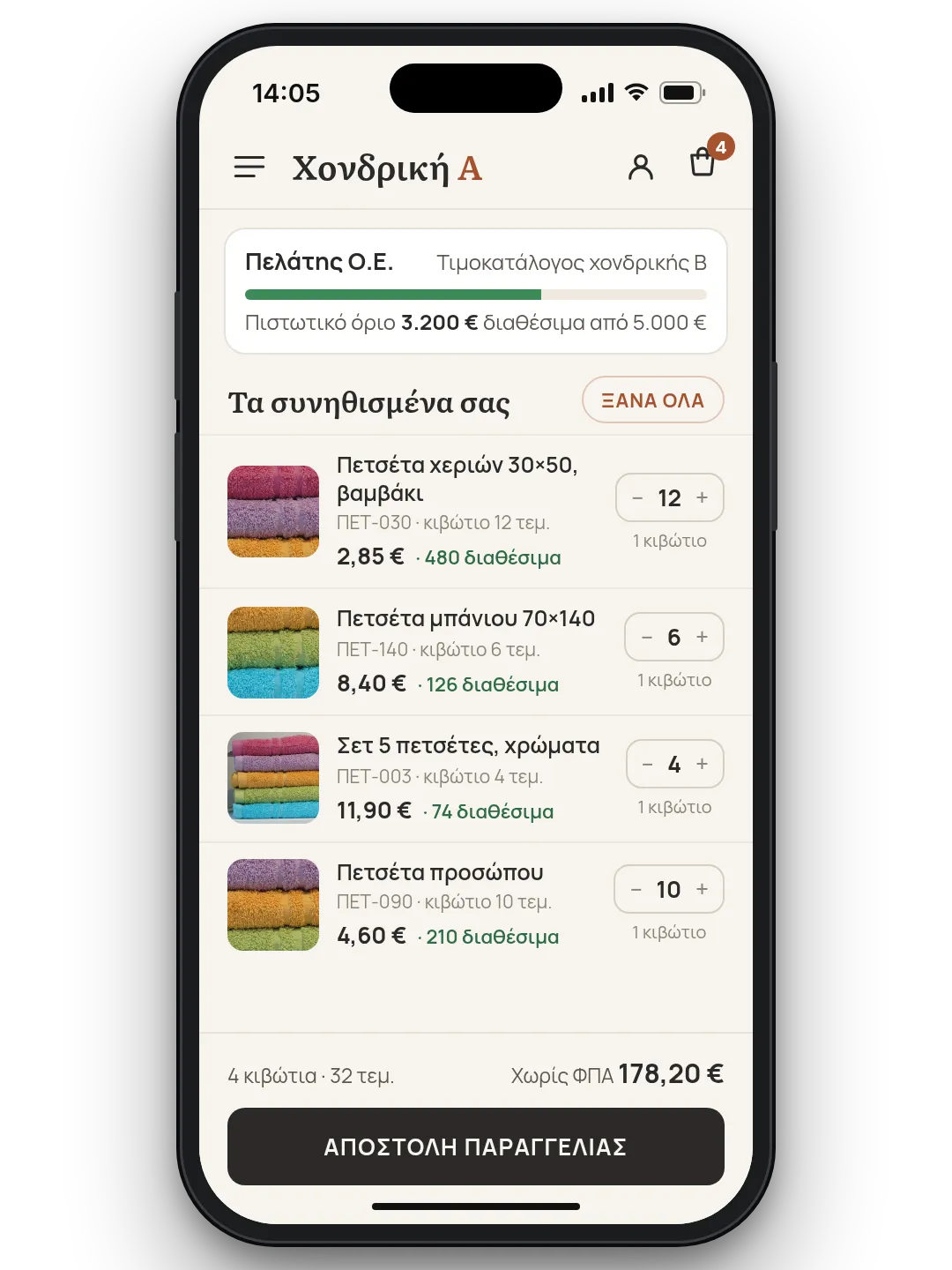
Trade customers, resellers and partners place their own orders, from a phone or a computer, instead of phoning, emailing and messaging. They log in to their account and see their own prices, the stock available and their credit limit.
We shape it around the way you sell: minimum quantities, pack sizes, the customer's own product codes, orders placed by a sales rep on a customer's behalf. Everything comes from Odoo, so the price they see is the price on the invoice.
If you want, it also becomes an Android app with your logo. See also how we set up a B2B eshop for wholesalers.
API INTEGRATIONS AND CUSTOM APPS THAT TAKE WORK OFF YOUR HANDS
If a job gets done by hand every day, we build the API integration or the app that does it for you. A few ideas to start with.
- Wholesale
A trade-ordering app on your customers' phones
An Android app with your logo that puts your ordering platform on every customer's phone. They order whenever they like, and you stop taking orders over the phone.
- Eshop and Odoo
Every WooCommerce order reaches Odoo's CRM
A WooCommerce plugin opens a sales opportunity in Odoo's CRM for every order, with nothing to install on the Odoo side. It finds the customer by VAT number or phone, retries anything that didn't go through, and leaves your salespeople's notes alone.
- Odoo
Bank transactions and company details by VAT number, inside Odoo
Bank transactions arrive on their own, and a company's details fill in from the Greek tax authority's registry. You glance, approve, and skip the typing.
- Warehouse
Barcode stocktake on a phone, with no lost scans
Your warehouse counts with barcode scanners or phone cameras. Every scan is saved at once and checked against the business system afterwards, so even if the network drops, nobody counts twice.
- Eshop
Product photos that publish themselves to WooCommerce
Your software publishes product photos straight to the eshop through the WooCommerce API. Nobody uploads images one by one again.
- App with roles
Your own app, with roles, card payments and a live map
Separate screens for customers, drivers and administrators, card payments, and the driver's position on the map as they move. If your business needs it, we make it an app.
Is the job that eats your hours not here? Tell us which one it is and we'll tell you how it can run by itself.
A CONNECTION THAT BECAME A PLATFORM
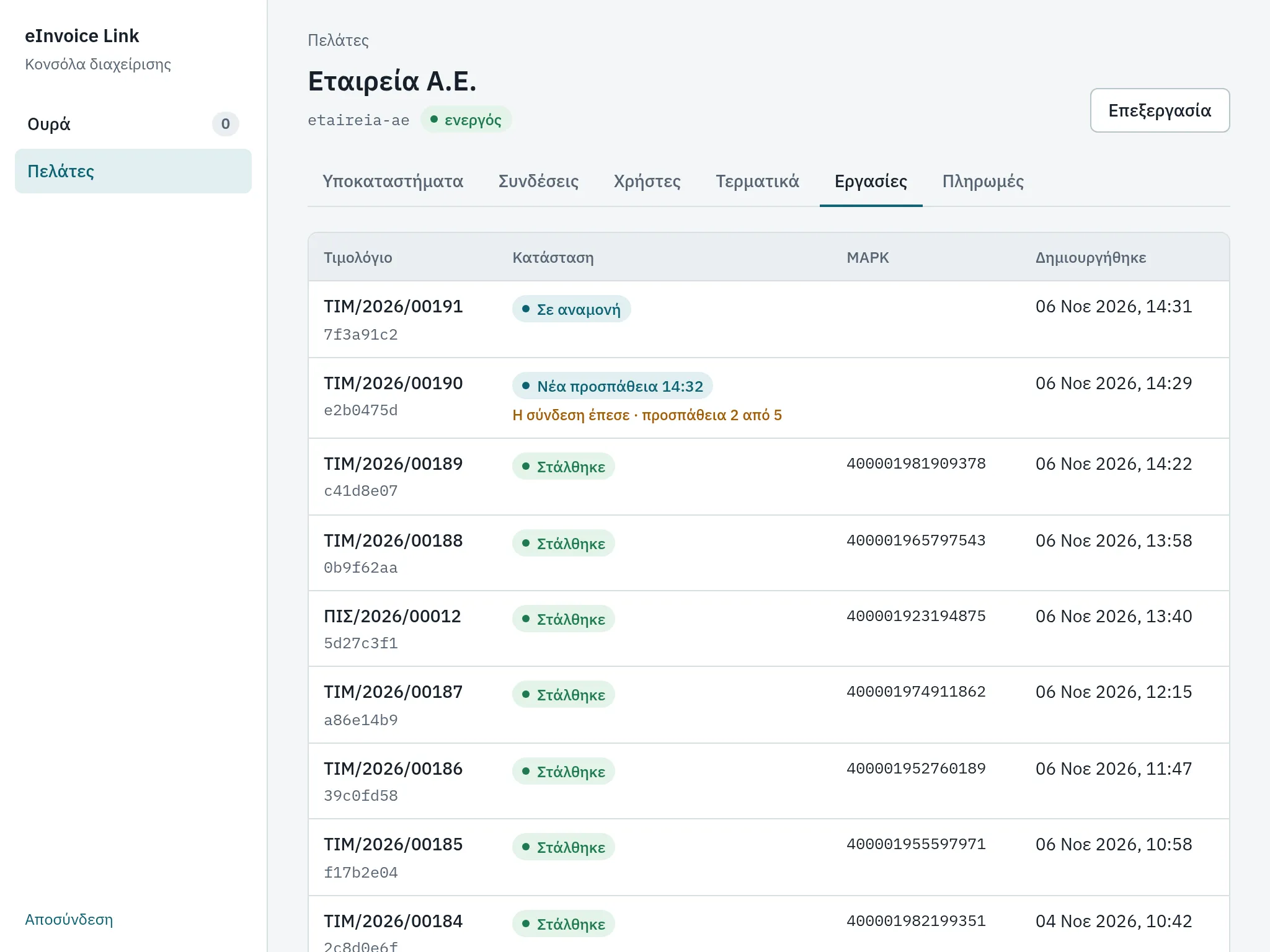
eInvoice Link is our own platform for Greek e-invoicing, and at heart it's one large connection: it takes invoices from Odoo, an eshop or another program, checks them, sends them to a licensed provider and brings back the MARK (the number the tax authority gives each invoice). Every connection we build for you follows the same rules: a waiting line, retries without duplicates, a console where you see what went through, and written instructions for whatever goes wrong.
GETS LOSTOUR OWN
PLATFORM
HOW WE BUILD AN API INTEGRATION, STEP BY STEP
As a rough guide, for one connection, such as an eshop and a courier:
You show us the job
Week 1. You show us what's done by hand today, where the data comes from and where it needs to go. We ask the courier, bank or partner for access to their test environment (sandbox).
Connection map and proposal
Weeks 1–2. We write down what goes where, how often, which system has the last word and what happens when something fails. With it you get a written proposal at a fixed price.
We build and test
Weeks 2–4. The connection is tested in the other system's test environment and on a copy of your Odoo or eshop, not the one you work in. We test the failures on purpose too: outages, slow answers, bad data.
Live, with a handover
The connection starts working for you. Anything that doesn't go through shows in a console or arrives by email, and you get the code together with a handover note.
QUESTIONS
What is a custom integration, and when do I need one?
It's code written for your case that moves data between two systems when no ready-made plugin does the job properly. You need one when someone in the office copies the same data from one system to another: courier vouchers, payments, trade customers' orders. We connect Odoo, WooCommerce and Shopify to couriers, banks, payment services and any system with an API.
Isn't there a ready-made plugin for this?
Often there is, and then we tell you before we write any code. Several Greek couriers, for example, have plugins that create vouchers from WooCommerce. A custom connection is worth it when the ready-made one doesn't do what you need, when other systems sit in the middle, such as Odoo and the warehouse, or when you want to know exactly what happens when something fails.
Our system has no API. Can it still be connected?
Usually, yes. If it exports and imports files (CSV, XML, Excel), the connection works with files at regular intervals. If it sends emails in a fixed format, it reads them. And where it's allowed, it reads the system's database directly. If the system you have today holds you back everywhere, see moving to Odoo.
What happens if the other system doesn't answer?
Nothing gets lost. Whatever didn't go through waits its turn and is resent, after the connection checks that it hasn't gone through already, so nothing happens twice. Anything that needs attention shows in a console or arrives by email. See it in the courier example, with the switch “What if the courier doesn't answer?”.
Will the connection break when Odoo is upgraded?
An upgrade can affect a connection, which is why we test it on a copy first. Odoo has also announced that its old connection methods (XML-RPC and JSON-RPC) will be removed and replaced by its new API (JSON-2). We write new connections straight on the new API, and move older ones over before it matters.
Our head office is abroad. Can you handle the Greek side?
Yes. We request the API access from the Greek courier, bank or partner, work through their documentation and support in Greek, and write the connection map in English, so your team at home can follow every decision.
Who owns the code?
What we write for you is yours. The code goes into a repository in your own account, the credentials for the courier or the bank stay in your systems, and at the end you get a handover note. If a connection runs on one of our own platforms, such as eInvoice Link, that's written into the connection map from the start.
How much does it cost?
It depends on how many systems are connected, which way the data goes and how well each API is documented. Once the connection map is written, we give you a fixed price.
RELATED SERVICES
Eshop–ERP integration
Prices, stock and orders between your eshop and Odoo, with a written map of which system has the last word.
Odoo & WooCommerce
One or several WooCommerce stores connected to Odoo both ways, with a waiting line and a console.
Wholesale & distribution
A B2B eshop with each customer's prices, a warehouse with scanning and one catalogue from every supplier.
Guide: which system has the last word
What to ask for in writing before a connection between two systems starts.
TELL US WHAT YOU COPY BY HAND TODAY.
One example is enough: what you copy, from which system, into which. We start from that and write down how the connection will work, how long it takes and at what fixed price.